
The customs software for export declarations.
In your browser, checked by experts.
Simply request an export declaration in your browser – without your own ATLAS access and without installing expensive software.
- Servers in the EU
- German company
- Customs expert review
Working with it, step by step
Start a declaration — with or without an account
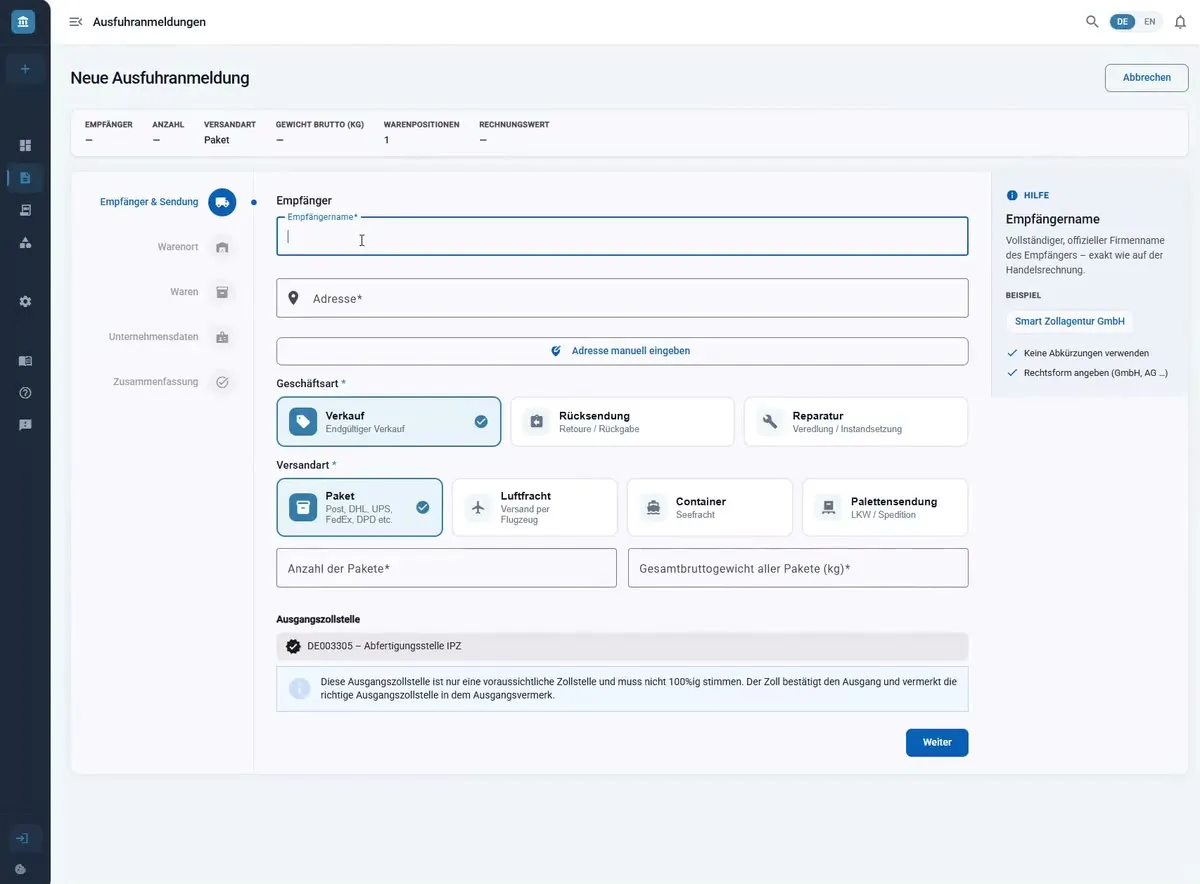
The wizard guides you step by step through consignee & shipment, goods location, goods, company data and summary. You need neither an ATLAS participant authorisation nor an account. Your draft is kept even if you close the page in between.
Enter goods and find the commodity code
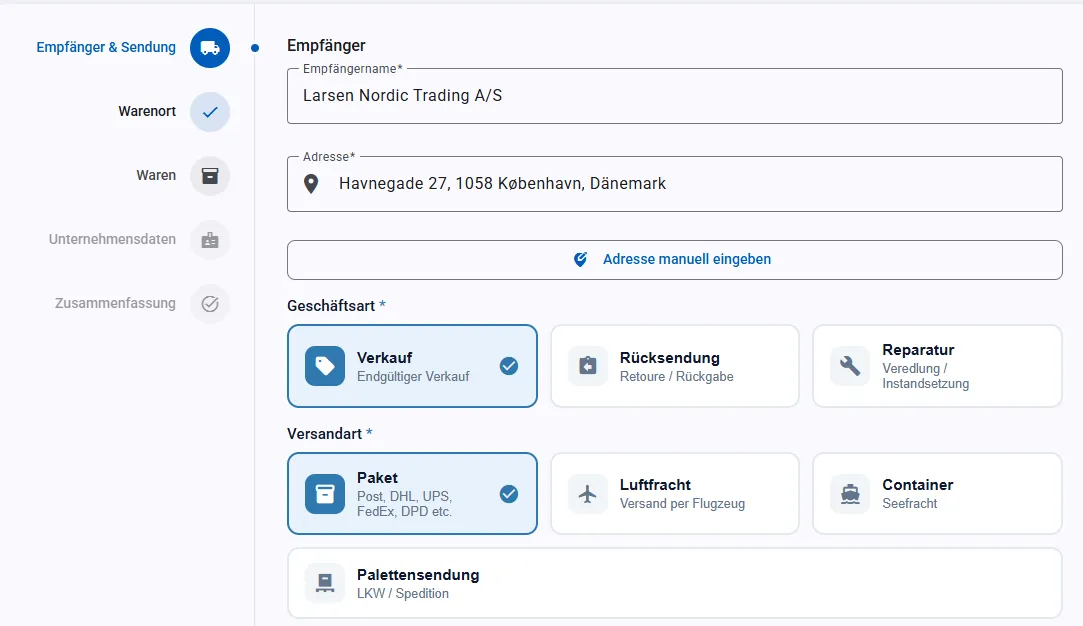
The commodity index is built in: search by goods description or number, right in the customs tariff number field, with results in the official wording. No switching to external tariff databases.
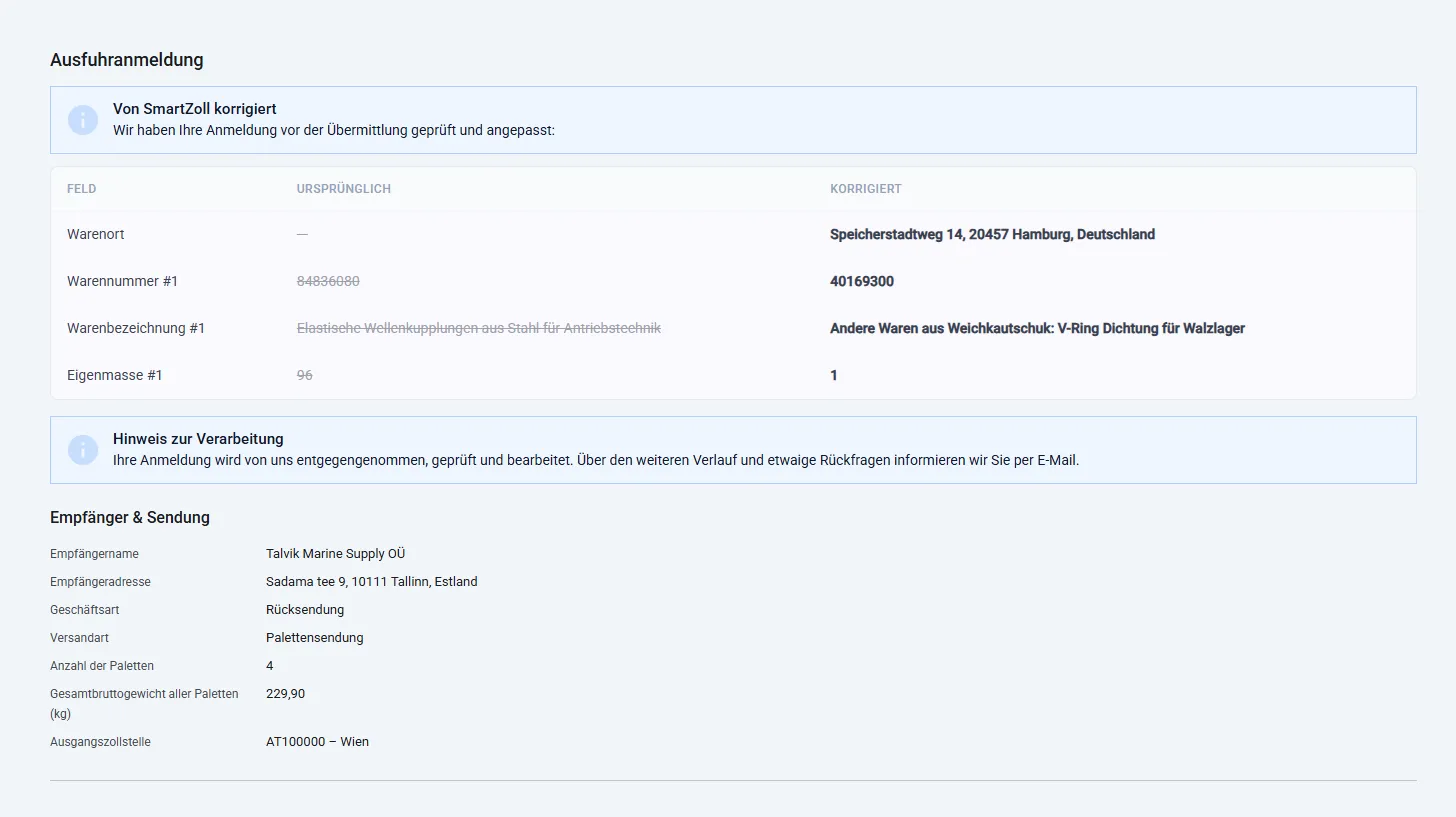
Customs experts review — every correction stays visible
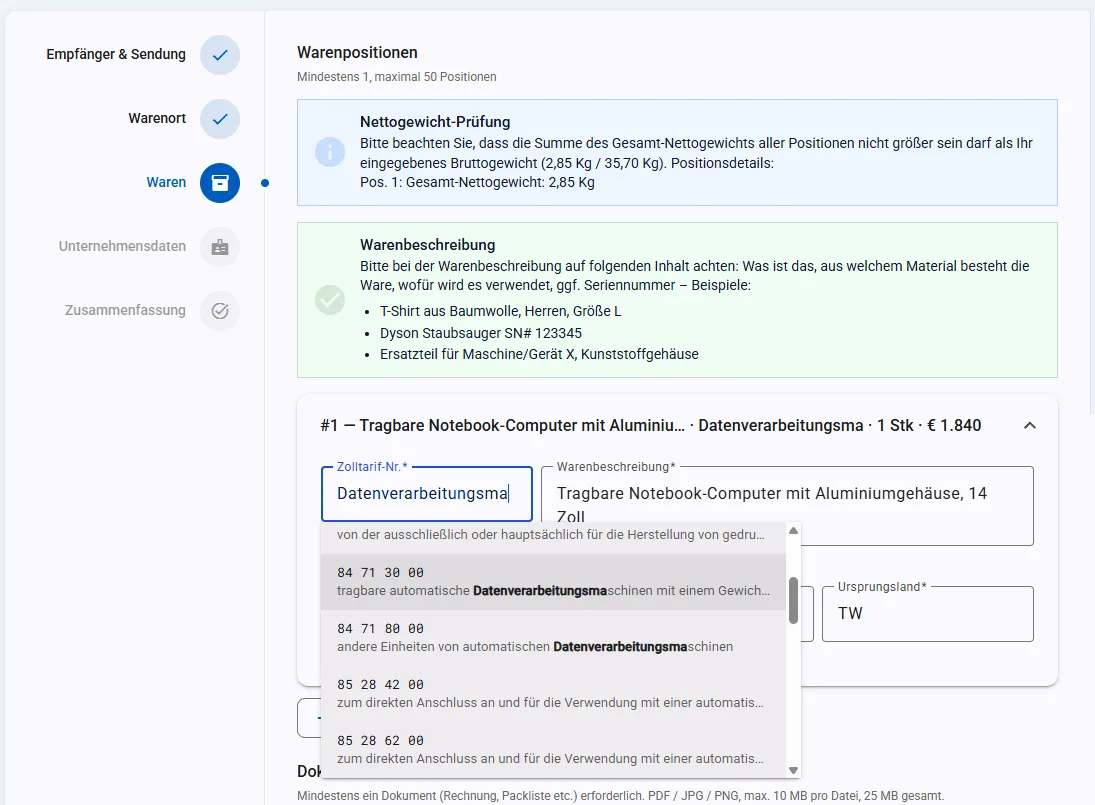
Before your declaration goes to customs, a customs expert reviews it. If something is corrected you can see exactly which field changed and what it contained before. You learn with every shipment instead of flying blind.
Full functionality is available to customers with a customer account.
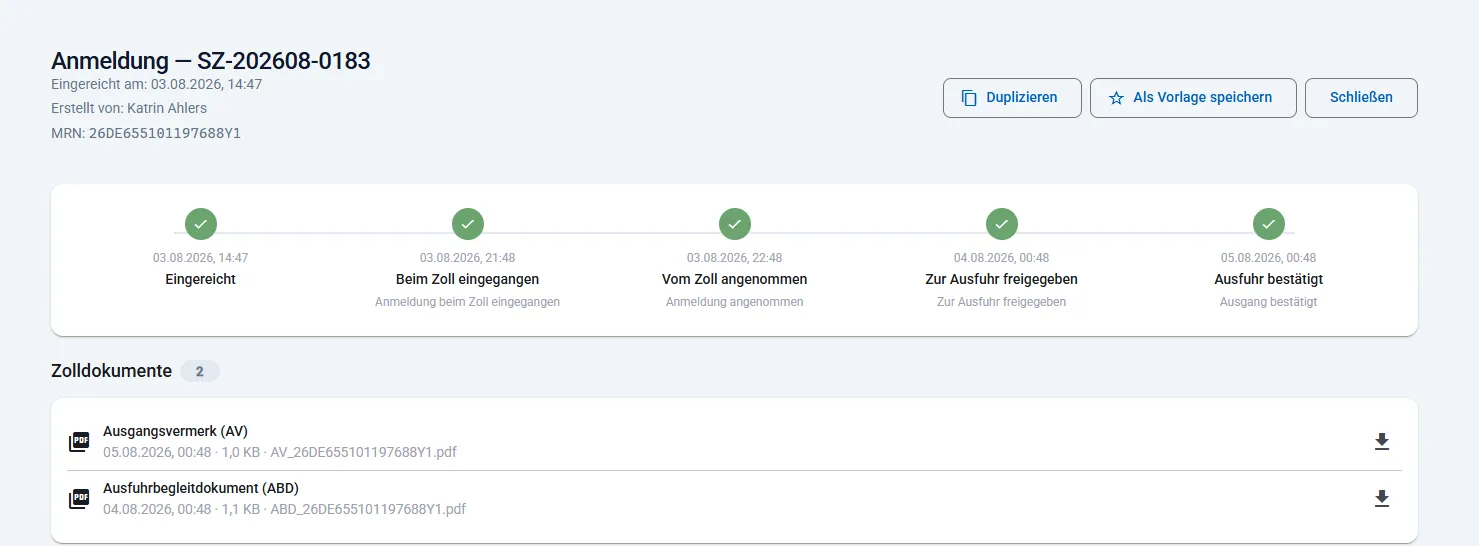
Track the status, get the MRN and documents
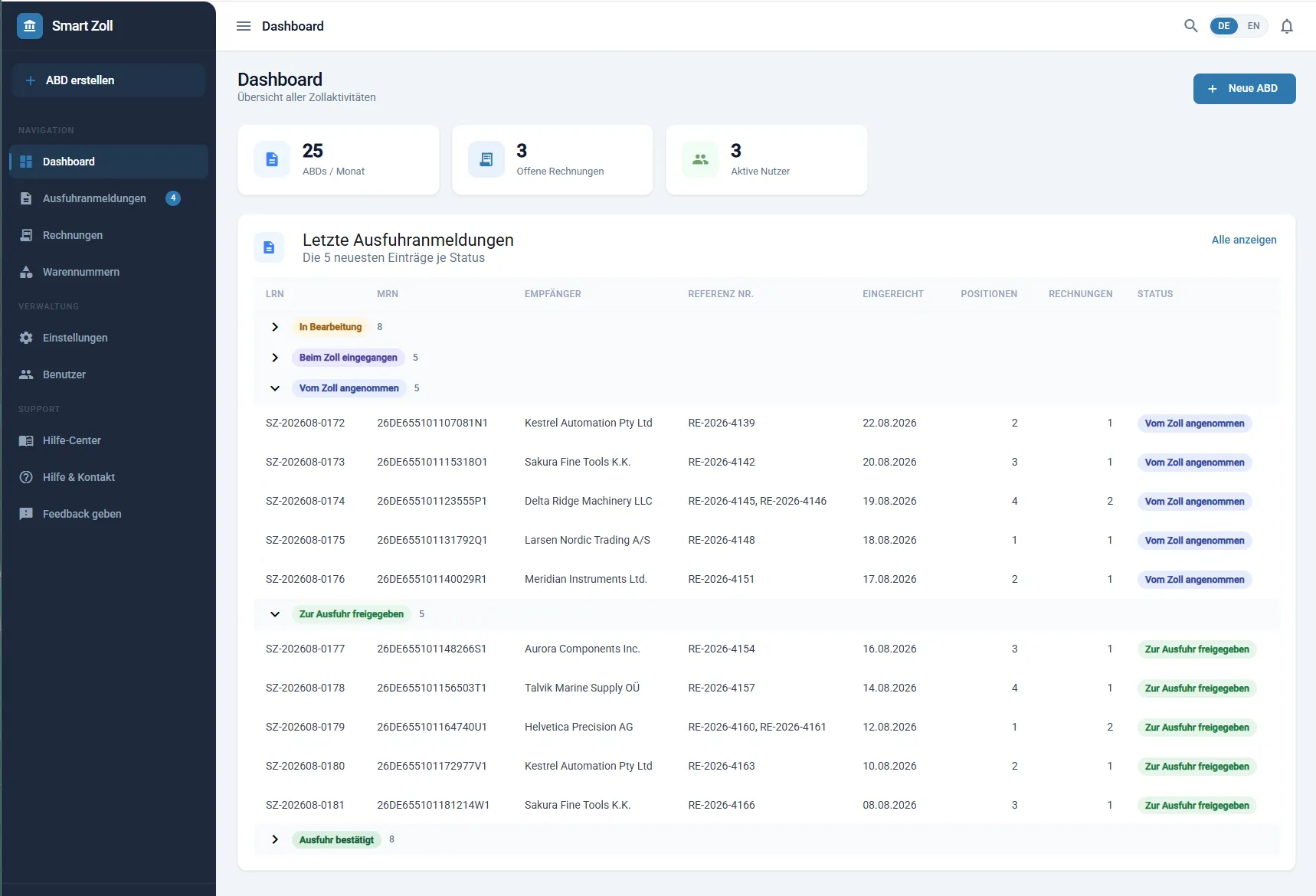
The status timeline shows every stage: awaiting documents, in progress, received by customs, accepted by customs, released for export, export confirmed. LRN and MRN appear in both the list and the detail view, and you download the ABD and other customs documents directly.
Full functionality is available to customers with a customer account.
Why open a free customer account?
Both paths lead to a completed export declaration. With a free customer account, everything is kept for you — and much more:
-
Status always visible
Status updates on your export declarations — you always know where things stand.
-
Central archive
All ABDs and AGVs at a glance, including a central archive and downloads.
-
Reuse declarations
Simply copy and reuse declarations — ideal for recurring shipments.
-
File faster
Create future ABDs faster from saved data and earlier declarations.
-
Help with the HS code
Support in finding the right commodity code — the code directory is available with an account only.
-
Everything in one place
Manage every declaration clearly in one place — no more digging through e-mails.
Continue without an account
For a one-off export declaration. What you give up:
- No status updates on your export declarations
- No archive for ABDs and AGVs
- Declarations cannot be copied
- Every further shipment starts from scratch
What the application does
Creating declarations
-
Start without registering
Begin a declaration and save the draft before you create an account.
-
Step-by-step wizard
Consignee & shipment, goods location, goods, company data, summary — with a summary bar and a jump to any step.
-
Templates and duplicates
Save recurring shipments as a template or duplicate an existing declaration.
-
Commodity codes included
Search commodity codes, browse the tree, and read the classification path and examples.
Staying in control
-
Status timeline per declaration
From “awaiting documents” to “export confirmed” — every stage traceable.
-
Expert corrections made visible
The changed field and its value before and after — right inside the declaration.
-
LRN and MRN at hand
Your own reference and the MRN assigned by customs, in the list and the detail view.
-
Download customs documents
Retrieve the ABD and other customs documents again at any time.
-
Invoices in the portal
View and download invoices for your declarations.
Team & integration
-
Users and roles
Company administrator, user and viewer — control access per employee.
-
Invitations and approvals
Invite colleagues, and review and approve requests to join your company.
-
Technical integration via API key
Submit declarations machine to machine, for example from your ERP system — authenticated with an API key and no browser involved.
-
German and English
Portal and support in both languages throughout.
-
In the browser, nothing to install
No local software, no ATLAS certificates, no IT project.
Filing in ATLAS yourself, customs software alone, or Smart Zoll?
Access and setup
- Filing in ATLAS yourself
- Accreditation and certificate required
- Customs software alone
- Licence, setup, usually training
- Smart Zoll
- Open a browser and start with or without an account
Professional review
- Filing in ATLAS yourself
- The responsibility rests entirely with you
- Customs software alone
- Checks formalities, not customs substance
- Smart Zoll
- A customs expert reviews every declaration before submission
Errors in the declaration
- Filing in ATLAS yourself
- Often surface only at customs
- Customs software alone
- Plausibility checks without professional judgement
- Smart Zoll
- Get corrected — and the change stays visible to you
Determining the commodity code
- Filing in ATLAS yourself
- Research in an external tariff database
- Customs software alone
- Varies by product
- Smart Zoll
- The commodity code directory is built in
Cost
- Filing in ATLAS yourself
- Internal effort and ongoing expertise
- Customs software alone
- Licence or monthly fee
- Smart Zoll
- €30 per declaration including one HS code. For higher volumes see the price list.
When customs comes back with questions
- Filing in ATLAS yourself
- You handle it yourself
- Customs software alone
- Direct communication with customs — the software gives no help with rejections
- Smart Zoll
- We handle it as your customs agency
API access: declarations straight from your own system
For regular volume there is an API: your system hands over the shipment data using an API key, and the expert review carries on exactly as before. No re-keying, no second portal — access granted within minutes.
You pay per declaration, not for software
Common questions about the application
-
Do I need my own ATLAS access?
No. Transmission to ATLAS runs through Smart Zollagentur. You need neither accreditation nor an ATLAS certificate nor any installed software — a browser is enough. -
Do I have to register before I can start?
No — you can begin without one. A free customer account is still worth having: only with an account are status updates, the archive and your earlier declarations kept. Without one, every further shipment starts from scratch. -
Do I need an EORI number?
Yes. Every export declaration requires an EORI number — without one the declaration cannot be transmitted to customs. -
What happens if I enter something incorrectly?
A customs expert reviews every declaration before submission. If something is corrected, you can see in the declaration which field changed and what it contained before. Please note: we cannot accept liability for incorrect or incomplete information about goods or documents. -
How quickly do I get feedback?
Usually within one hour of submitting. Processing happens the same working day; declarations filed by 11 a.m. receive the ABD the next working day. -
Where is my data stored?
The application runs on servers in the European Union. It is operated by Smart Zollagentur GmbH, based in Düsseldorf — so your point of contact sits in Germany. Details of the processing are set out in our privacy policy. -
What does it cost?
The software itself is free — no licence, no setup, no monthly fee. You pay €30 per export declaration including one tariff item, and €5 for each additional tariff item. From 15 declarations a month the volume rate starts at €25. All prices exclude VAT.
Open your free customer account
Free, with nothing to install. Your declarations, documents and their status stay with you — and customs experts review every declaration before it reaches customs.